
Welcome to the Every Fire Survivor's Network
We are glad you found us.
EFSN is a community of 10,000+ Eaton, Palisades, and Malibu survivors and allies come together here to navigate recovery, take on broken systems, and make sure no one has to do this alone. If you are a survivor wanting to connect with others on the same journey, this is where clarity starts. If you are an ally who wants to help in a real way, this is where to plug in.
WHAT TO EXPECT FROM THIS NEWSLETTER
Every week: insurance and claims developments, policy and legislative wins, financial resources, rebuilding guidance, and concrete ways to accelerate recovery for your family and your neighbors.
A COMMUNITY THAT GOES DEEPER: OUR DISCORD SERVER
The newsletter keeps you informed. Our Discord server is where survivors connect in real time.
Discord is a free app, similar to WhatsApp or Slack, organized into topic-specific channels so you can easily find help with insurance, rebuilding, or housing, or simply connect with others who understand what you are going through. Thousands of survivors are already there, sharing resources and supporting one another every day.
Joining is entirely optional. Many members find it invaluable. Others prefer to stay connected through the newsletter alone. Either way, we are glad you are here.
Your personal Discord invite link is below. It will wait for you until you are ready.
With care,
Joy Chen and the EFSN Team
P.S. You can unsubscribe at any time, but we hope you will stay. Los Angeles fire survivors and allies are stronger together.
IF YOU'D LIKE TO JOIN OUR DISCORD, HERE'S HOW
We know the setup can feel like a lot. Take it one step at a time.
We’ve also included a short video that walks you through the process visually.
Getting Started: Download Discord
- On your phone: Search "Discord" in the App Store or Google Play and tap Install.
- On your computer: Visit discord.com and click Download.
- No download needed: Use Discord directly in your browser at discord.com.
Step 1: Accept the Discord Invite
After signing up for our newsletter, you’ll receive a welcome email with your Discord invite link.
Open that email and click the link.
Then click “Accept Invite.”
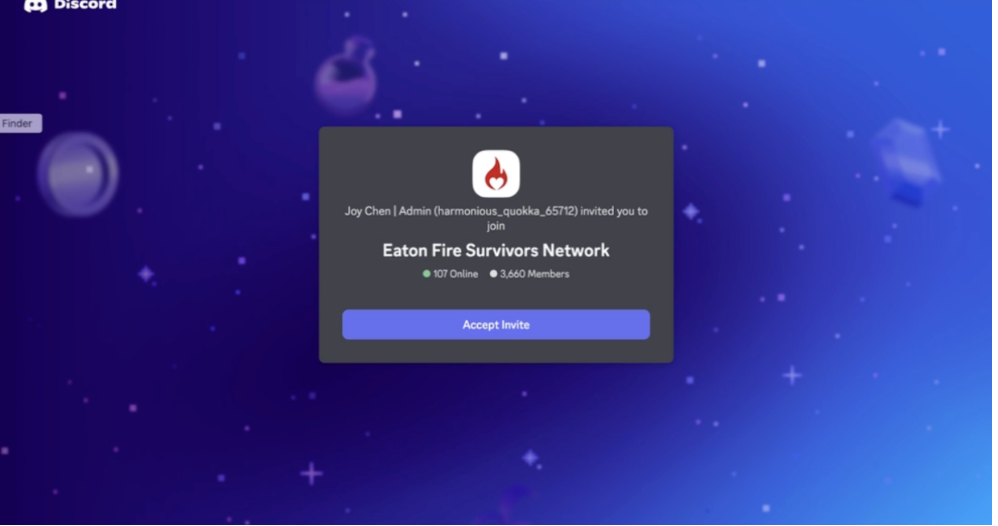
Already have a Discord account? Just log in and you will be added to EFSN automatically.
Step 2: Create a Username
New to Discord? You will be prompted to choose a username (real name or anonymous), enter your birthday, and click "Create Account."
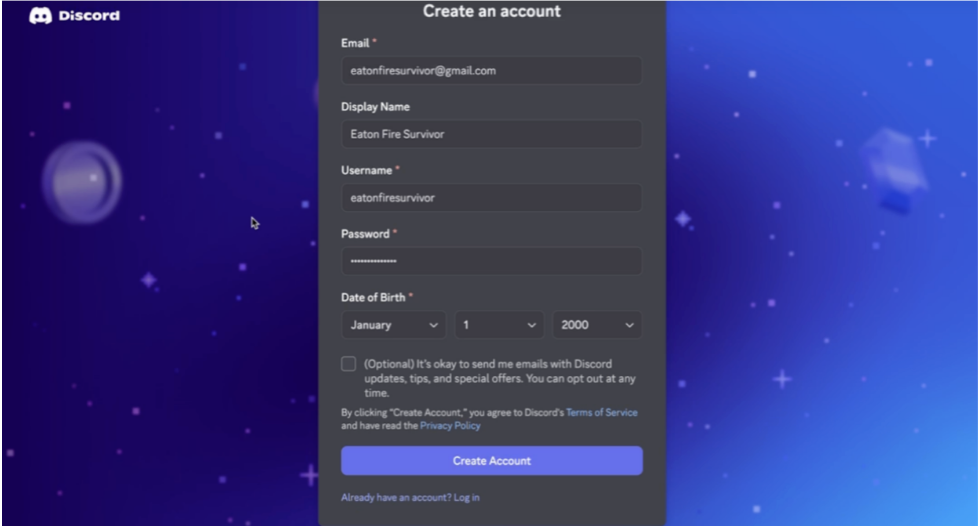
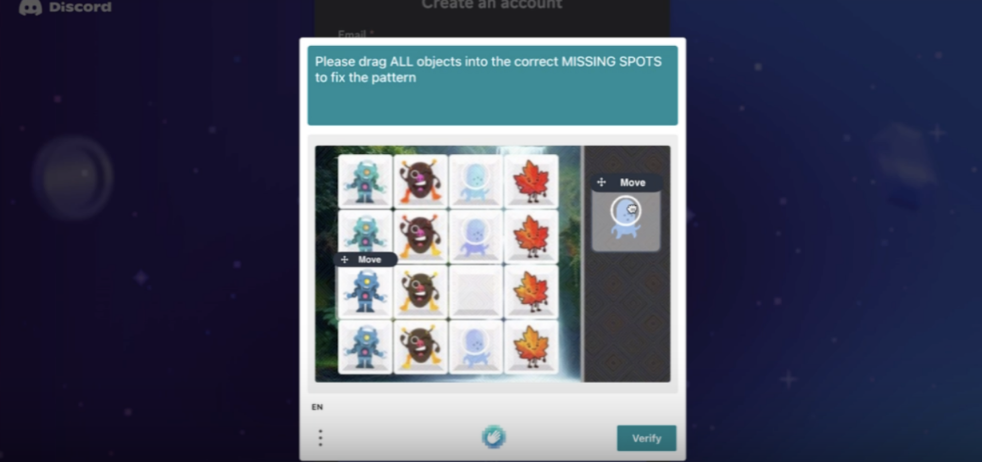
Step 3: Quick Human Check
You may be asked to complete a short puzzle to confirm you are human. It only takes a moment.
Step 4: Claim Your Account
Enter your email address and create a password. Use the email you check most often.
Step 5: Confirm Your Email
Check your inbox for an email from Discord and click "Verify Email," then "Continue to Discord." You are in.
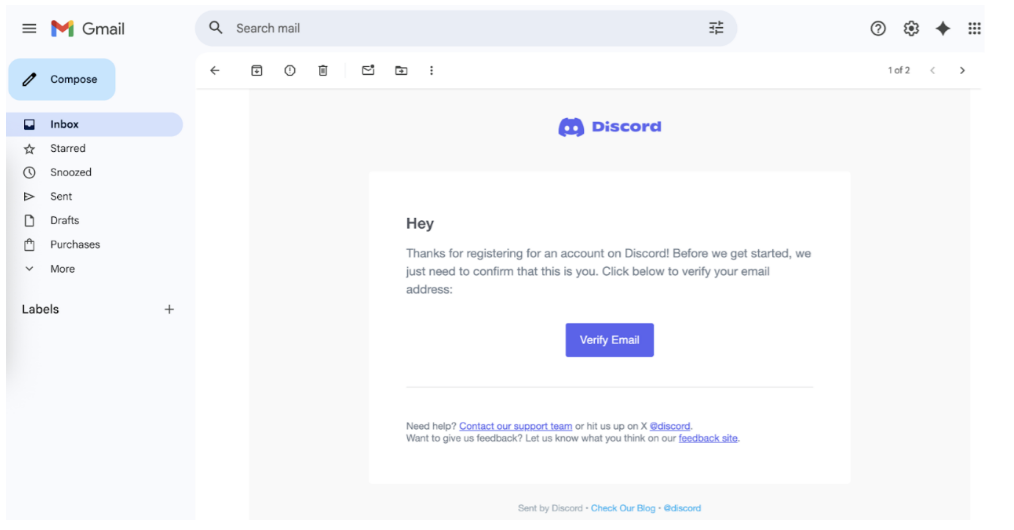
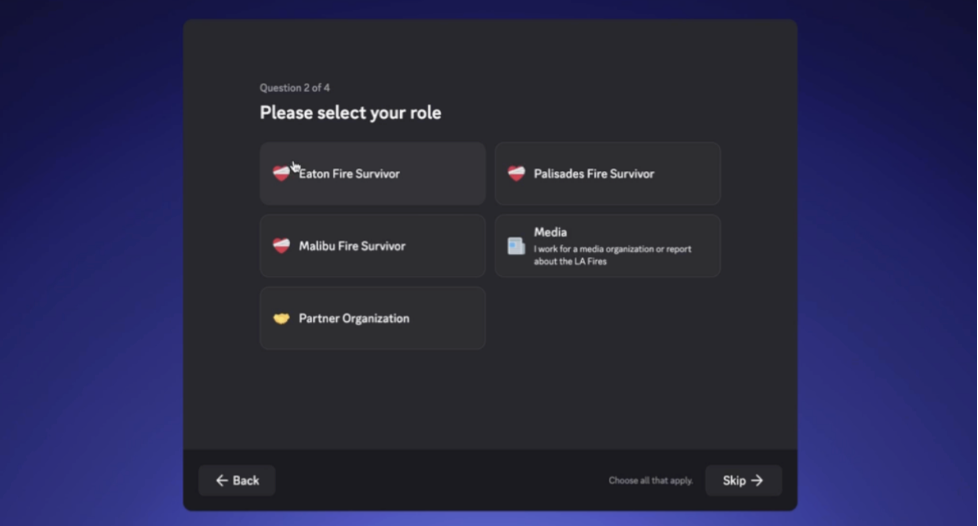
Step 6: Quick Community Questionnaire
You will be guided through 4 short questions about your survivor status, whether you are home or displaced, which fire affected you, and your insurance provider. This helps us point you to the right channels.
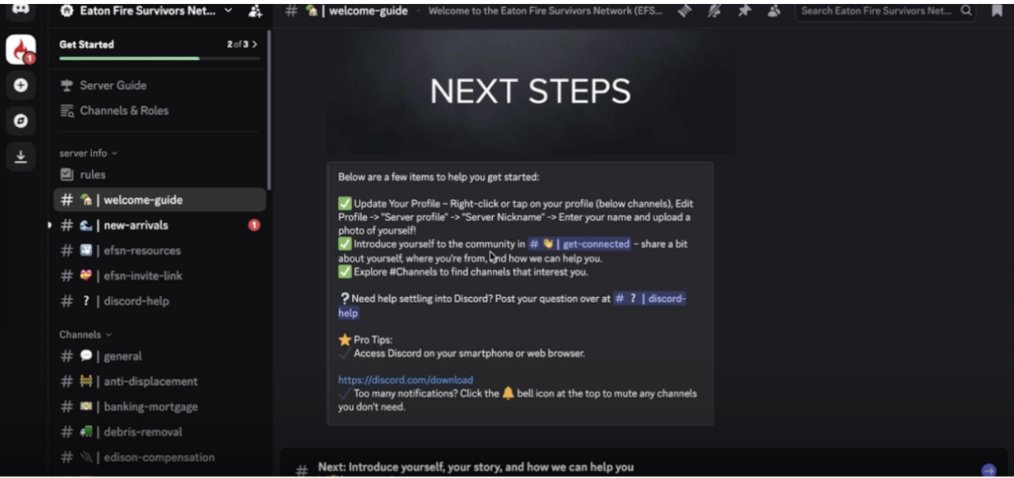
Step 7: Complete Your Welcome Checklist
Read the Welcome message, review the Community Guide and Guidelines, and introduce yourself if you feel up to it. Once done, you are fully set up.
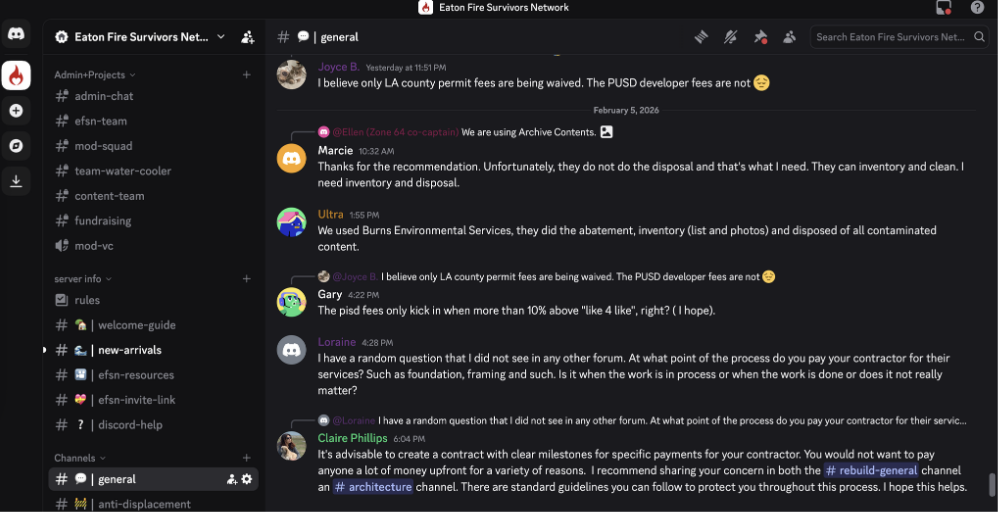
Step 8: Explore the Community
On the left-hand side, you’ll see:
• Main community channels
• Topic-specific channels for insurance, rebuilding, housing, emotional support, and more
You can participate in group conversations or connect one-on-one anytime you like.
If you get stuck at any point, take a breath. You can come back to this at any time. We’re here when you’re ready.
Troubleshooting the Discord
If you’re having trouble signing up for or logging into Discord, here are some troubleshooting steps you can take to help you log onto the channel.
1. Try the basics first
Double check you're using the right email/username/phone number tied to the account.
Reset your password via "Forgot Password" on the login screen. Discord sends a reset email.
Make sure caps lock isn't on and there's no autofill weirdness.
2. If password reset isn't landing
Check spam/junk folder for the reset email
If you switched emails and don't have access anymore, use Discord's account recovery form at https://support.discord.com. They can help if you can verify ownership another way.
3. If you're locked out due to 2FA
Use backup codes if you saved them during setup.
No backup codes → you'll need to go through Discord's support ticket process for 2FA recovery (they'll ask for proof of account ownership).
4. If it's a specific server you can't access (not your whole account)
You might've been kicked, banned, or the server could be down. That's different from an account login issue. Worth clarifying which one you're dealing with.
5. Browser/app gremlins
Clear cache or try an incognito window.
Try the web version (discord.com/app) if the desktop/mobile app is acting up,
Update the app if it's outdated.
If none of this works, Discord's official support portal (support.discord.com) is the most reliable next step. Submitting a ticket there gets you a real human looking at account-specific issues.